

Appearance
New Shell Command Action Item
Selecting Shell Execute Action creates a New Shell Command Action Item under the Action Steps Tab.
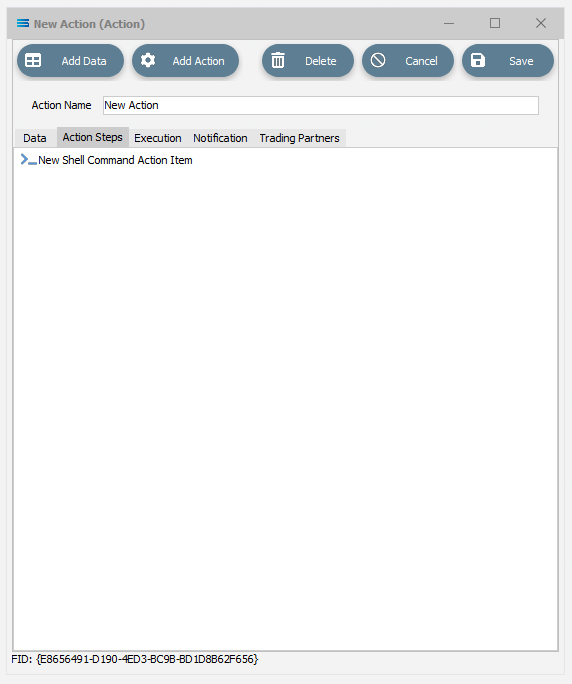
Click on the item to access the fields.
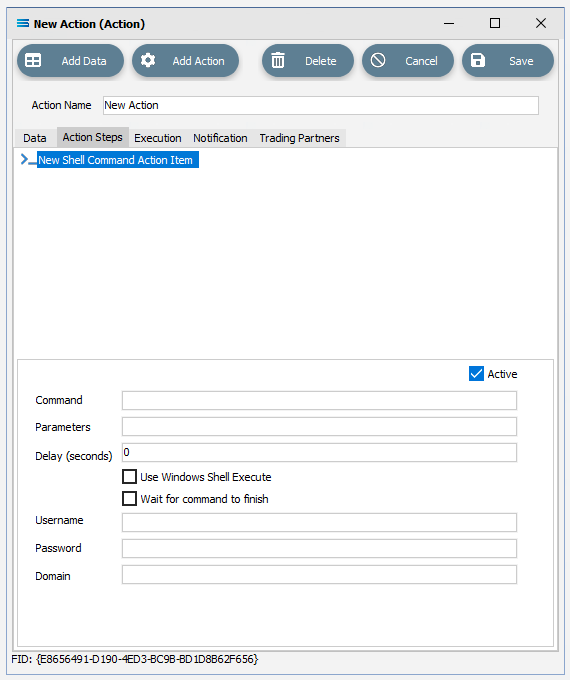
Fields
| Field Name | Description |
|---|---|
| Active | Tick this box to make this step “active”. You can skip this step by deactivating it. |
| Command Line | Enter the command line to be executed. |
| Parameters | |
| Delay (secconds) | Used with Wait for command to finish. Enter the number of seconds to wait for the command to finish before continuing to the next Action Step, regardless of whether the command has finished executing. Enter 0 to wait indefinitely. |
| Use Windows Shell Execute | Select to use Windows Shell Execute, otherwise the command is executed as a process. You must use Windows Shell Execute if the command is not an executable, but a registered file extension such as BAT, or VBS. |
| Wait for command to finish | Select to wait for the command to finish before continuing with the next Action Step. Specify the Delay to determine how long to wait. If not selected, the next Action Step will execute immediately whether the command is finished or not. |
| Username | Enter a Windows user name to impersonate this user to run the command. Leave this field blank to execute the command under the Windows user running the Statelake application. |
| Password | The password for the user as named in the Username field. |
| Domain | The domain that the user belongs to. This can be left blank. |