

Appearance
SSH Settings
SSH is an acronym for Secure Shell - a network communication protocol that enables two computers to communicate securely over a potentially unsecured network.
The SSH protocol is a method for secure remote login from one computer to another.
Secure File Transfer Protocol or SFTP, allows for the secure transfer of files using SSH and encrypted FTP commands, to avoid password sniffing and the exposure of sensitive information in plain text.
Selecting SSH Settings opens a fresh expandable SSH Settings Editor window.
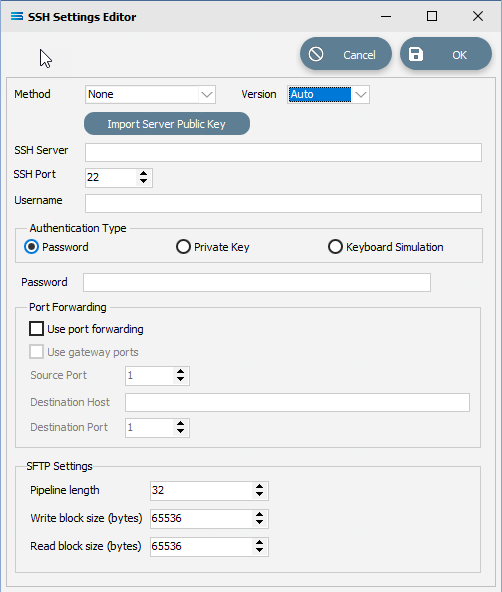
Fields
| Field Name | Description |
|---|---|
| Method | Select the method to use from the available choices on the drop-down list. This is where you can select SFTP. The default is None. |
| Version | Select the applicable version. The default is Auto. |
| SSH Server | The domain name or IP address of the remote SSH server or service. |
| SSH Port | The port that the remote SSH service is listening on. A default value will automatically display. |
| Username | A user name to access and connect to the remote SSH server or service. |
| Authentication Type | Select one of the available options. |
| Password/Private Key/Keyboard Simulation | Enter as appropriate, depending on the Authentication Type selected. |
| Port Forwarding. Use port forwarding | Tick this box is Port Forwarding is to be used. |
| Use gateway ports | Active only if Port Forwarding is selected. Select if Gateway Ports are to be used. |
| Source port | Active only if Port Forwarding is selected. The number for the Source Port. |
| Destination Host | Active only if Port Forwarding is selected. The address of the Destination Host. |
| Destination port | Active only if Port Forwarding is selected. The number for the Destination Port. |
| SFTP Settings. Pipeline length | Select as appropriate. The default is 32. |
| Write block size (bytes) | Select as appropriate. The default is 65536. |
| Read block size (bytes) | Select as appropriate. The default is 65536. |
Buttons
| Button Name | Description |
|---|---|
| OK | Click OK once all details have been entered. |
| Cancel | Click Cancel to cancel any changes or input made. |
| Import Server Public Key | Import the Public Key from the remote server. |