

Appearance
Anatomy Of An HTTP Response
Status-Line
The Status-Line is the single line that identifies and lists the highest HTTP version that the server supports, followed by the Status-Code and the Reason-Phrase, as illustrated by these examples.
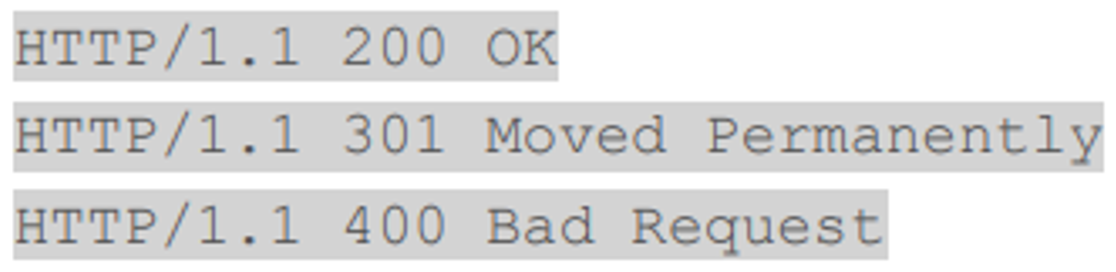
The Status-Line Response Code tells you the type of response - a successful response returns a status code of 200, while a failure returns 400, an access refusal would return 401, and a permanent move would return code 301. Please refer to HTTP Status Codes for more information.
Message Headers
Message Headers are optional. They contain information about the response, such as the Date the message was sent, information about the Server, and what the body contains (the Content-Type).
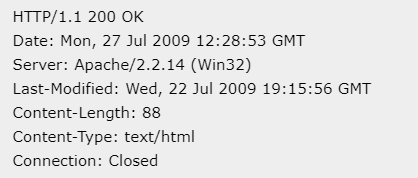
Example of a Response Message Header
There are many different headers that can appear in a response. Always just a single line, they consist of a header string followed by a colon, and then a value.
Blank Line
A Blank Line is always included between the headers and Message Body, and will be included even if the headers and/or body are omitted.
The Blank Line is a CR/LF, as are all end-of-line markers in HTTP 1.1.
Message Body
The Message Body is also optional, although in most cases it contains the bulk of the response from the server.
This is where the html and image response for a web browser’s request goes, and the XML or JSON response for a REST client’s request.
While the Message Headers will always be text, the Message Body can contain either text or binary data.
The headers are read until the double end-of-line marker (CR/LF,CR/LF) one from the last header line, and the 2nd from the Blank Line. At this stage, the body can be read, based on the Content-Type and Content-Encoding headers received.
For REST connections, the body will probably be in text format.