Appearance
Run Action Via
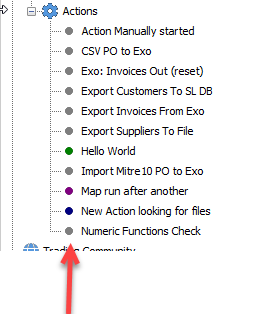
The way that the Action will display in the tree structure within the Actions module, is solely dependent on the run type selected in this pane.
Each selection is colour-linked.

| Radio Button | Action Display Attribute |
|---|---|
| When you manually start it | The Action dot will display in GREY. Such as the example below “Action Manually started”. |
| Monitor for incoming files | The Action dot will display in BLUE. Such as the example below “New Action looking for files”. |
| Run at scheduled intervals | The Action dot will display in GREEN. Such as the example below “Hello World”. |
| Run after another action | The Action dot will display in VIOLET. Such as the example below “Map run after another”. |