

Appearance
Advanced Tab - DB (Database) Connections
The Advanced options for the DB Connection.
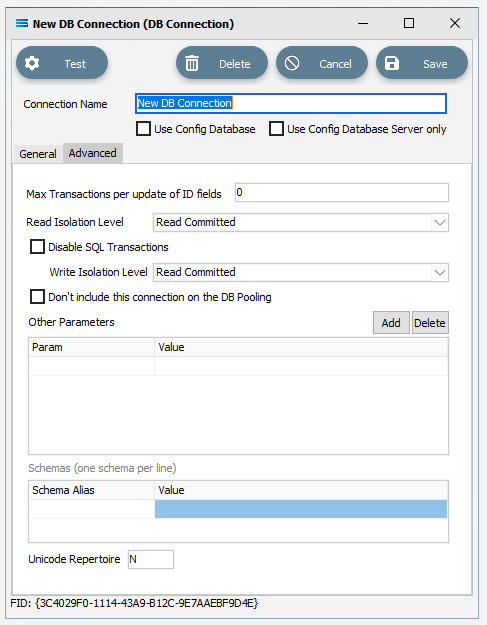
Fields
| Field Name | Description |
|---|---|
| Max Transactions per update of ID fields | Used only when the Use Custom ID Field is selected on the related DB Definition. This setting controls the maximum number of ID’s included in the “IN” clause. 0 (zero) means there is no limit. Some database servers will impose a limit on an “IN” clause. |
| Read Isolation Level | |
| Disable SQL Transactions | The default behaviour is to use SQL Transactions to enable rollback. Tick this box to disable SQL Transaction rollback in the event of failed Actions. |
| Write Isolation Level | |
| Don’t include this connection on the DB Pooling | Tick if this DB Connection is not to be included in the DB Pooling. When ticked, the DB Connection is not re-used and will be released after the Action execution. You will want to use this option for ODBC connections. |
| Other Parameters (Add/Delete) | Add or delete additional settings to send through to the database server. |
| Schemas | Specify a different active Schema, and alias for the Schema, from the default dbo. prefix for the database referenced by this connection. |
| Unicode Repertoire |