

Appearance
Email Settings Tab - General Setup
Email Setting options that apply to the configuration as a whole that you need to review regarding sending of emails.
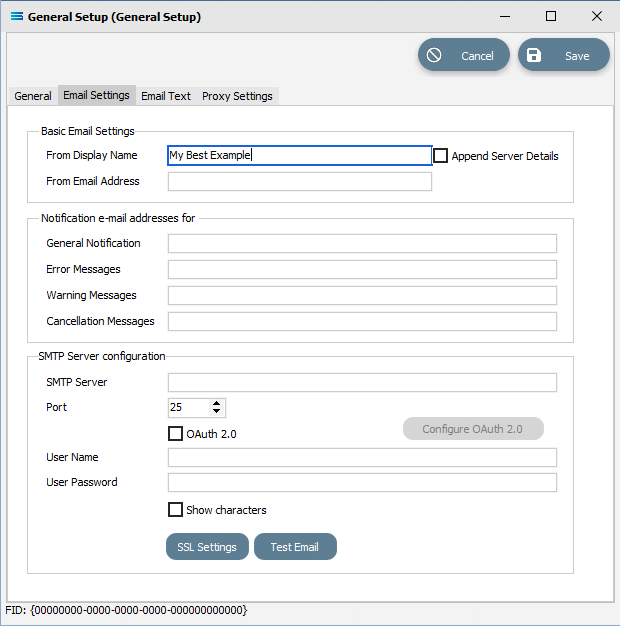
Fields
| Field Name | Description |
|---|---|
| From Display Name | Enter the name that will be displayed as the sender by people reading the email. |
| Append Server Details | Adds the sending server address to the Display Name. |
| From Email Address | Enter the email address that will be used as the sender. |
| General Notification | Enter a comma separated list of email addresses that will be the default for sending General Notifications to. You can override this on a per Action basis. Refer to the Notification tab in the Action configuration. |
| Error Messages | Enter a comma separated list of email addresses that will be the default for sending Error Messages to. |
| Warning Messages | Enter a comma separated list of email addresses that will be the default for sending Warnng Messages to. |
| Cancellation Messages | Enter a comma separated list of email addresses that will be the default for sending Cancellation Messages to. |
| SMTP Server | Only available if Use in-built SMTP server is deselected. Enter the computer name or IP address of the SMTP server. |
| Port | Enter the port the SMTP server is listening on. This is normally always port 25. |
| OAuth 2.0 | If this button us ticked, then the Configure OAuth 2.0 button will be activated. |
| User Name | Only available if Use in-built SMTP server is deselected. Enter a user name if you need to authenticate to the SMTP server otherwise leave blank. |
| User Password | Only available if Use in-built SMTP server is deselected. Enter a password for the above user. |
| Show Characters | Click the box to show the User Password. |
Buttons
| Button Name | Description |
|---|---|
| SSL Settings | Click to edit the SSL settings used when making the connection to the SMTP server. A new pop-up window will appear. |
| Test Email | Click to send a test email using the above settings. The settings will be saved prior to the test being performed. The test email will be sent to the General Notification email address. |