

Appearance
Date And Time Format Specifiers
Date And Time Format Specifiers are used to control the behaviour of functions such as FormatDateTime and StringToDateTime.
The specifier sets out how a date value is to be formatted as a string or how it is to be derived from a string, by providing rich formatting of the TDateTime value DateTime into a string.

These specifiers use a sequence of codes to represent the various components of a date and time, and often include separator characters between the component codes. This is a formatting string, which can comprise of a mix of ordinary characters that are passed unchanged to the result string, along with other data formatting characters.
Specifiers can be used to:
- derive or format date values using script functions, and to
- derive or format date values from within File Definitions.
Although the list of codes and usage of specifiers is similar across the various contexts in which they can be used, there are some important differences.
For additional information, please refer to DateTime (TDateTime).
Basic Codes
| Component | Basic Code in Specifier | Additional Codes |
|---|---|---|
| Year Year and Century | yy yyyy | yy for a year value without the century. yyyy for a year including the century. |
| Month | m mm mmm mmmm | m for month number without a leading zero. mm for the month with a leading zero. mmm for the abbreviated short month name such as Jan or Feb. mmmm for the full long month name e.g. January or March. |
| Day | d dd ddd dddd | d for the day number without a leading zero. dd for the day number with a leading zero. ddd for abbreviated day short name such as Mon or Tue. dddd for full long day name e.g. Monday or Friday. |
| Hour | h hh | h for hour value without a leading zero. hh for the hour value with a leading zero. |
| Minute | n nn | n for the minute value without a leading zero. nn for the minute with a leading zero. Do not confuse this with the m for month. |
| Second | s ss | s for second value without a leading zero. ss for the second value with a leading zero. |
| Millisecond | z zz zzz | z for millisecond value without any leading zero. zz for milliseconds used in StringToDateTime only. zzz for the millisecond value with as many leading zeros as required. |
| AM/PM | a/p A P AM PM AMP AMPM am/pm | AP for a single letter in the value string such as A or P, to identify AM or PM. AM, PM, AMP, or AMPM for a two-character value such as AM or PM. More details can be found below. |
| Separators | / - . : <space> | The separator character can be either a forward slash (/), hyphen (-), comma (,), colon (😃, or space. |
| "Escape" character(s) | “<phrase>” | An “escape” character in this context, is a character or phrase enclosed within a pair of double-quote (“) characters (as “ “), so that it is not interpreted, but displayed as it is. So if you want to see characters such as dd in the formatted output, place them in double-quote marks such as “dd” to stop them being interpreted as date or time elements. |
Use In File Definitions
Date And Time Format Specifiers are used in File Definitions to derive date-time values from, or to format date-time values into, the corresponding string of characters for that field within the body of a data file.
The Data Type of the field in the File Definition must be set as DateTime, Date, or Time if any of the Date Format Specifiers are to be used.
The Format Specifier is saved into the Display Format for the field, as illustrated below.
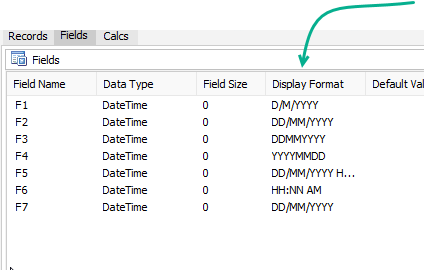
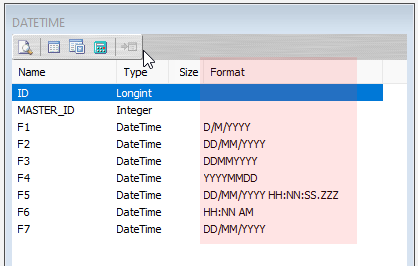
Be aware of the distinction between the source and destination in a Map.
For a File Definition used as a source for a Map, the Display Format for a DateTime field will behave as described below for specifiers used with StringToDateTime.
For a File Definition used as a destination for a Map, the Display Format for a DateTime field will behave as described below for specifiers used with FormatDateTime.
FormatDateTime
Used with the destination in a Map, it is important to note the differences for the specifiers associated with FormatDateTime.
All of the basic codes as above, can be used to display the value of the corresponding component from the date/time value.
Component codes are not case-sensitive (i.e. DD has the same effect as dd and dD), except that AM/PM outputs in the case used in the specifier.
Codes am and pm cannot be used as display specifiers - they must be am/pm, AM/PM, aM/pM, Am/Pm, or a/p (or a variation).
Codes c, ddddd, dddddd, t, tt, ampm use Windows format settings, as follows, depending on your regional settings:
- c - Short Date Format followed by Long Time Format.
- ddddd - Short Date Format.
- dddddd - Long Date Format.
- t - Short Time Format.
- tt - Long Time Format.
- ampm - AM or PM display string, before or after noon.
Codes e, ee, g, and gg are reserved for displaying the period/era year for some Asian locales in Windows.
The / date separator and : time separator will display the corresponding separator from Windows date/time settings, although this may be ., -, etc.
Other separator characters will appear "as is" in the formatted output.
All other characters will appear "as is".
To display a component code or Windows separator as it is written, such as "T" as "T", then it must be escaped by enclosing it within a pair of double quotes.
The following code illustrates several examples.
pascal
procedure ScriptEvent (var Value : variant);
var
  MyDateValue : TDateTime;
begin
 // Examples for FormatDateTime
  MyDateValue := EncodeDateTime(2023, 2, 21, 13, 4, 5, 6);
  LogInfo('');
  LogInfo(FormatDateTime('m/d/yy', MyDateValue)); // usually outputs 2/21/23
  LogInfo(FormatDateTime('d.m.yy', MyDateValue)); // Outputs as 21.2.23
  LogInfo(FormatDateTime('d m yy', MyDateValue)); // Outputs as 21 2 23
  LogInfo(FormatDateTime('m"/"d"/"yy', MyDateValue)); // always outputs 2/21/23
  LogInfo(FormatDateTime('dddd, dd mmm yyyy', MyDateValue)); // outputs Tuesday, 21 Feb 2023
  LogInfo(FormatDateTime('yyyy-mm-dd"T"hh:nn:ss.zzz', MyDateValue)); // outputs 2023-02-21T13:04:05.006
  LogInfo(FormatDateTime('hh" hours and "n" minutes" aM/Pm', MyDateValue)); // outputs 13 hours and 4 minutes Pm
  LogInfo(FormatDateTime('h:nn AM/PM', MyDateValue)); // outputs 1:04 PM
  LogInfo(FormatDateTime('h n aM/Pm', MyDateValue)); // outputs 1 4 Pm
  LogInfo(FormatDateTime('h "h" n aM/Pm', MyDateValue)); // outputs 13 h 4 Pm
  LogInfo(FormatDateTime('hhnn hrs', MyDateValue)); // outputs 1304 13r5
  LogInfo(FormatDateTime('hhnn "hrs"', MyDateValue)); // outputs 1304 hrs
  LogInfo(FormatDateTime('yyyy-mm-dd', 0)); // outputs 1899-12-31
  LogInfo(FormatDateTime('\yyyy\yyyy_mm\', MyDateValue)); // outputs \2023\200623_02\
  LogInfo('');
  MyDateValue := EncodeDateTime(2023, 2, 21, 10, 35, 17, 8);
  LogInfo('');
  LogInfo(FormatDateTime('hh" hours and "n" minutes" Am/Pm', MyDateValue)); // outputs 10 hours and 35 minutes Am
  LogInfo(FormatDateTime('h:nn AM/PM', MyDateValue)); // outputs 10:35 AM
  LogInfo(FormatDateTime('h:nn:ss AM/PM', MyDateValue)); // outputs 10:35:17 AM

end;
StringToDateTime
Used with the source in a Map, it is important to note the differences for the specifiers associated with StringToDateTime.
Many of the basic codes as above can be used to derive the value of date components from a string of digits, optional letters, and optional separators.
Component codes, and letters in value strings, are not case-sensitive (i.e. DD, WeD, aMPm have the same effect as dD, wed, and AMPM respectively).
When used before a separator, the Day, Month, and Hour codes will behave as two-letter codes even if the one-letter form is used. The one-letter form is recommended ahead of a separator, if either one or two digits may appear in the value string.
If yy is used, then the century is determined as per the Windows settings, in that if the year is greater than or equal to 30, then the century is taken as 19 and the full year as 19yy.
The additional codes n and s cannot be used with StringToDateTime - use nn and/or ss.
The additional code for milliseconds is zz and not z.
Codes ddd, dddd are ignored by StringToDateTime. The day of the week will be determined by the combination of day, month, and year values.
The codes for AM/PM are:
- AP for a single letter in the value string (e.g. A), or
- AM, PM, AMP, or AMPM for a two-character value (e.g. AM).
A value of A for a single letter code, or AM for a two-letter value, will be taken as before noon. An hour value of 12 for a before-noon code will be taken as 0. An hour value of less than 12, for other than an A or AM value, will be incremented by 12 hours.
Any character or sequence of characters that does not represent a component code is taken as a separator. There are no “escape” characters for StringToDateTime.
If no valid non-zero date component is derived from the string, and at least one time component is non-zero, then the system date will be used to populate the date portion.
If the derived value for Day, Month, or overall date, is invalid then a zero date/time value is returned.
An illustration of the use of StringToDateTime follows.
pascal
procedure ScriptEvent(var Value:Variant);
begin
  Value := StringToDateTime('d/m/yyyy','3/2/2006'); // returns date of 3/02/2006
  LogInfo(Value);
  Value := StringToDateTime('d/m/yyyy','23-02-2006'); // returns date of 23/02/2006
  LogInfo(Value);
  Value := StringToDateTime('ddmmyyyy','23022006'); // returns date of 23/02/2006
  LogInfo(Value);
  Value := StringToDateTime('yyyymmdd','20060223'); // returns date of 23/02/2006
  LogInfo(Value);
  Value := StringToDateTime('d/m/yyyy h:nn:ss.zzz','23/02/2006 13:04:05.006'); // returns 23/02/2006 1:04:05 pm
  LogInfo(Value);
  Value := StringToDateTime('dd/mm/yyyy','3/2/2006'); // returns 12:00:00 am - or zero, not enough digits in value
  LogInfo(Value);
  Value := StringToDateTime('hh:nn am','03:04 PM'); // returns date/time of 3:04:00 pm on the run date
  LogInfo(Value);

 // STOP HERE if you want the Log to be successful
 // The following code will cause an error as the input is invalid
  Value := StringToDateTime('dd/mm/yyyy','32/13/2006'); // returns zero (invalid input)
  LogInfo(Value);
end;
Another longer example of the use of the StringToDateTime function.
pascal
procedure ScriptEvent (var Value : variant);
var
  varSpecifier: string;
  varDateValueStr: string;
  varAssertStr: string;
  varDateTime: TDateTime;
  year, month, day: string;
begin

  year := '2015'; month := '11'; day := '07';
  varSpecifier := 'd/m/yyyy';
  LogInfo('date: ' + year + '-' + month + '-' + day);
  varDateTime := StringToDateTime(varSpecifier, day + '/' + month + '/' + year);
  LogInfo(' - > ' + FormatDateTime('dd/mm/yyyy hh:nn:ss.zzz', varDateTime));
  varSpecifier := 'yyyy-m-dd'; // this d or dd is not "before separator", so suffers from previous problem
  LogInfo('date: ' + year + '-' + month + '-' + day);
  varDateTime := StringToDateTime(varSpecifier, year + '-' + month + '-' + day);
  LogInfo(' - > ' + FormatDateTime('dd/mm/yyyy hh:nn:ss.zzz', varDateTime));

  LogInfo('-------------------------------------');
  LogInfo('--- Examples for StringToDateTime ---');
  LogInfo('');

  varSpecifier := 'd/m/yyyy';
  varDateValueStr := '3/2/2006';
  varAssertStr := 'returns date of 3 Feb 2006';
  varDateTime := StringToDateTime(varSpecifier, varDateValueStr);
  LogInfo(varDateValueStr + ' as ' + varSpecifier + ' - > ' + FormatDateTime('dd/mm/yyyy hh:nn:ss.zzz', varDateTime) + '; assert: ' + varAssertStr);

  varSpecifier := 'd/m/yyyy';
  varDateValueStr := '03/2/2006';
  varAssertStr := 'returns date of 3 Feb 2006';
  varDateTime := StringToDateTime(varSpecifier, varDateValueStr);
  LogInfo(varDateValueStr + ' as ' + varSpecifier + ' - > ' + FormatDateTime('dd/mm/yyyy hh:nn:ss.zzz', varDateTime) + '; assert: ' + varAssertStr);

  varSpecifier := 'd/m/yyyy';
  varDateValueStr := '3/02/2006';
  varAssertStr := 'returns date of 3 Feb 2006';
  varDateTime := StringToDateTime(varSpecifier, varDateValueStr);
  LogInfo(varDateValueStr + ' as ' + varSpecifier + ' - > ' + FormatDateTime('dd/mm/yyyy hh:nn:ss.zzz', varDateTime) + '; assert: ' + varAssertStr);

  varSpecifier := 'd/m/yyyy';
  varDateValueStr := '03/02/2006';
  varAssertStr := 'returns date of 3 Feb 2006';
  varDateTime := StringToDateTime(varSpecifier, varDateValueStr);
  LogInfo(varDateValueStr + ' as ' + varSpecifier + ' - > ' + FormatDateTime('dd/mm/yyyy hh:nn:ss.zzz', varDateTime) + '; assert: ' + varAssertStr);

  varSpecifier := 'd/m/yyyy';
  varDateValueStr := '23/12/2006';
  varAssertStr := 'returns date of 23 Dec 2006';
  varDateTime := StringToDateTime(varSpecifier, varDateValueStr);
  LogInfo(varDateValueStr + ' as ' + varSpecifier + ' - > ' + FormatDateTime('dd/mm/yyyy hh:nn:ss.zzz', varDateTime) + '; assert: ' + varAssertStr);

  varSpecifier := 'd/m/yyyy';
  varDateValueStr := '23-02-2006';
  varAssertStr := 'returns date of 23 Feb 2006';
  varDateTime := StringToDateTime(varSpecifier, varDateValueStr);
  LogInfo(varDateValueStr + ' as ' + varSpecifier + ' - > ' + FormatDateTime('dd/mm/yyyy hh:nn:ss.zzz', varDateTime) + '; assert: ' + varAssertStr);

  varSpecifier := 'ddmmyyyy';
  varDateValueStr := '23022006';
  varAssertStr := 'returns date of 23 Feb 2006';
  varDateTime := StringToDateTime(varSpecifier, varDateValueStr);
  LogInfo(varDateValueStr + ' as ' + varSpecifier + ' - > ' + FormatDateTime('dd/mm/yyyy hh:nn:ss.zzz', varDateTime) + '; assert: ' + varAssertStr);

  varSpecifier := 'yyyymmdd';
  varDateValueStr := '20060223';
  varAssertStr := 'returns date of 23 Feb 2006';
  varDateTime := StringToDateTime(varSpecifier, varDateValueStr);
  LogInfo(varDateValueStr + ' as ' + varSpecifier + ' - > ' + FormatDateTime('dd/mm/yyyy hh:nn:ss.zzz', varDateTime) + '; assert: ' + varAssertStr);

  varSpecifier := 'd/m/yyyy hh:nn:ss.zzz';
  varDateValueStr := '23/02/2006 13:04:05.006';
  varAssertStr := 'returns date/time of 13:04:05.006 on 23 Feb 2006';
  varDateTime := StringToDateTime(varSpecifier, varDateValueStr);
  LogInfo(varDateValueStr + ' as ' + varSpecifier + ' - > ' + FormatDateTime('dd/mm/yyyy hh:nn:ss.zzz', varDateTime) + '; assert: ' + varAssertStr);

  varSpecifier := 'hh:nn am';
  varDateValueStr := '03:04 PM';
  varAssertStr := 'returns date/time of 15:04:00.000 on the run date';
  varDateTime := StringToDateTime(varSpecifier, varDateValueStr);
  LogInfo(varDateValueStr + ' as ' + varSpecifier + ' - > ' + FormatDateTime('dd/mm/yyyy hh:nn:ss.zzz', varDateTime) + '; assert: ' + varAssertStr);

  varSpecifier := 'dd/mm/yyyy';
  varDateValueStr := '3/2/2006';
  varAssertStr := 'returns zero (not enough digits in value)';
  varDateTime := StringToDateTime(varSpecifier, varDateValueStr);
  LogInfo(varDateValueStr + ' as ' + varSpecifier + ' - > ' + FormatDateTime('dd/mm/yyyy hh:nn:ss.zzz', varDateTime) + '; assert: ' + varAssertStr);

  varSpecifier := 'dd/mm/yyyy';
  varDateValueStr := '32/13/2006';
  varAssertStr := 'returns zero (invalid input)';
  varDateTime := StringToDateTime(varSpecifier, varDateValueStr);
  LogInfo(varDateValueStr + ' as ' + varSpecifier + ' - > ' + FormatDateTime('dd/mm/yyyy hh:nn:ss.zzz', varDateTime) + '; assert: ' + varAssertStr);

  varSpecifier := 'd/m/yyyy';
  varDateValueStr := '';
  varAssertStr := 'returns zero (invalid input)';
  varDateTime := StringToDateTime(varSpecifier, varDateValueStr);
  LogInfo(varDateValueStr + ' as ' + varSpecifier + ' - > ' + FormatDateTime('dd/mm/yyyy hh:nn:ss.zzz', varDateTime) + '; assert: ' + varAssertStr);

  varSpecifier := 'd/m/yyyy';
  varDateValueStr := '123456';
  varAssertStr := 'returns zero (invalid input)';
  varDateTime := StringToDateTime(varSpecifier, varDateValueStr);
  LogInfo(varDateValueStr + ' as ' + varSpecifier + ' - > ' + FormatDateTime('dd/mm/yyyy hh:nn:ss.zzz', varDateTime) + '; assert: ' + varAssertStr);

  varSpecifier := 'd/m/yyyy';
  varDateValueStr := 'xxx';
  varAssertStr := 'returns zero (invalid input)';
  varDateTime := StringToDateTime(varSpecifier, varDateValueStr);
  LogInfo(varDateValueStr + ' as ' + varSpecifier + ' - > ' + FormatDateTime('dd/mm/yyyy hh:nn:ss.zzz', varDateTime) + '; assert: ' + varAssertStr);

  LogInfo('-------------------------------------');
end;
Source Data Integrity
Not every source file will have valid date and/or time data - there could be typing or input errors, or some other form of data corruption that could cause a File Definition to fail.
On execution, if the runtime manager is forced into an error state, the Log will fail and the data will be rolled back - the Log will display as PINK,
To prevent any error or perceived error from occurring, it is often better to assume that any source data will be invalid, and not rely on these date and time fields and formats.
Instead, read any date and/or time information as a String.
By forcing these fields into Strings, you can manipulate them into the correct format at Map level and have more control.
The Map can then also control any error response and respond appropriately without crashing or causing a major upheaval.
And to mitigate any flow on issues, any date and/or time information written to a destination can be handled the same way - as a String.
While this is not essential, it is another method that may have a more stable outcome.
Using SLStringToDateTimeEx User-defined Function
This test script sets up and utilises a user-defined function called SLStringToDateTimeEx to manipulate dates and times.
pascal
function SLStringtoDateTimeEx(const DateTimeFormat : string; const DateTimeStr : string) : TDateTime;
var
  NOT_SPECIFIED: integer;
  TIME_AM: integer;
  TIME_PM: integer;

  i,ii,iii : integer;
  Retvar : TDateTime;
  Tmp,
  Fmt,Data,Mask,Spec : string;
  Year,Month,Day,Hour,
  Minute,Second,MSec : word;
  AmPm : integer;
  lfmt: integer;
  LongDayNames: array [1..7] of string;
  LongMonthNames: array [1..12] of string;
  TwoDigitYearCenturyWindow: integer;
begin
  NOT_SPECIFIED := 0;
  TIME_AM := -1;
  TIME_PM := 1;

  TwoDigitYearCenturyWindow := 50;

  Year := 0;
  Month := 0;
  Day := 0;
  Hour := 0;
  Minute := 0;
  Second := 0;
  MSec := 0;
  Fmt := UpperCase(Trim(DateTimeFormat));
  Data := UpperCase(Trim(DateTimeStr));
  i := 1;
  Mask := '';
  AmPm := NOT_SPECIFIED;
  lfmt := length(Fmt);

 //check if data blank because if blank "i" never gets incremented so stuck in eternal loop
 while (i < lfmt) and (Data<>'') do begin
 if Pos(Fmt[i], 'APDMYHNSZ') > 0 then begin
 // Start of a date specifier
      Mask  := Fmt[i];
      ii := i + 1;

 // Keep going till not valid specifier
 while true do
 begin
 if ii > lfmt then Break; // End of specifier string
        Spec := Mask + Fmt[ii];

 if (Spec = 'DD') or (Spec = 'DDD') or (Spec = 'DDDD') or
           (Spec = 'MM') or (Spec = 'MMM') or (Spec = 'MMMM') or
           (Spec = 'YY') or (Spec = 'YYY') or (Spec = 'YYYY') or
           (Spec = 'HH') or (Spec = 'NN') or (Spec = 'SS') or
           (Spec = 'ZZ') or (Spec = 'ZZZ') or (Spec = 'PM') or
           (Spec = 'AP') or (Spec = 'AM') or (Spec = 'AMP') or //need to add PM check in here
           (Spec = 'AMPM') then
 begin
          Mask := Spec;
          inc(ii);
 end else
 begin
 // End of or Invalid specifier
          Break;
 end;
 end;

 // Got a valid specifier ? - evaluate it from data string
 if (Mask <> '') and (length(Data) > 0) then begin
 // Day 1..31
 if (Mask = 'D') then begin
 // JTS #1795 - 'hasextra' tests are too fragile.  Simply look for 2 digits
 //              first then 1 digit if that fails

           Day := StrToIntDef(trim(copy(Data, 1, 2)), 0);
 if (Day=0) or (Day>31) then
 begin
            Day := StrToIntDef(trim(copy(Data,1,1)),0); //otherwise get single digit day
            delete(Data,1,1);
 end else
            delete(Data,1,2);
 end;

 if (Mask = 'DD') then begin
           Day := StrToIntDef(trim(copy(Data,1,2)),0);
           delete(Data,1,2);
 end;

 // Day Sun..Sat (Just remove from data string)
 if Mask = 'DDD' then delete(Data,1,3);

 // Day Sunday..Saturday (Just remove from data string LEN)
 if Mask = 'DDDD' then begin
          Tmp := copy(Data,1,3);
 for iii := 1 to 7 do begin
 if Tmp = Uppercase(copy(LongDayNames[iii],1,3)) then begin
              delete(Data,1,length(LongDayNames[iii]));
              Break;
 end;
 end;
 end;

 // Month 1..12
 if (Mask = 'M') then begin
 // JTS #1795 - 'hasextra' tests are too fragile.  Simply look for 2 digits
 //              first then 1 digit if that fails

           Month := StrToIntDef(trim(copy(Data, 1, 2)), 0);
 if (Month=0) or (Month>12) then
 begin
            Month := StrToIntDef(trim(copy(Data,1,1)),0); //otherwise get single month value
            delete(Data,1,1);
 end else
            delete(Data,1,2);
 end;

 // Month 1..12
 if (Mask = 'MM') then begin
           Month := StrToIntDef(trim(copy(Data,1,2)),0);
           delete(Data,1,2);
 end;

 // Month Jan..Dec
 if Mask = 'MMM' then begin
          Tmp := copy(Data,1,3);
 for iii := 1 to 12 do begin
 if Tmp = Uppercase(copy(LongMonthNames[iii],1,3)) then begin
              Month := iii;
              delete(Data,1,3);
              Break;
 end;
 end;
 end;

 // Month January..December
 if Mask = 'MMMM' then begin
          Tmp := copy(Data,1,3);
 for iii := 1 to 12 do begin
 if Tmp = Uppercase(copy(LongMonthNames[iii],1,3)) then begin
              Month := iii;
              delete(Data,1,length(LongMonthNames[iii]));
              Break;
 end;
 end;
 end;

 // Year 2 Digit
 if Mask = 'YY' then begin
          Year := StrToIntDef(copy(Data,1,2),0);
          delete(Data,1,2);
 if Year < TwoDigitYearCenturyWindow then
            Year := (YearOf(Date) div 100) * 100 + Year
 else
            Year := (YearOf(Date) div 100 - 1) * 100 + Year;
 end;

 // Year 4 Digit
 if Mask = 'YYYY' then begin
          Year := StrToIntDef(copy(Data,1,4),0);
          delete(Data,1,4);
 end;

 // Hours
 if Mask = 'H' then begin
           Hour := StrToIntDef(trim(copy(Data,1,2)), 24); //see if hour is two digits
 if (Hour > 23) then
 begin
            Hour := StrToIntDef(trim(copy(Data,1,1)),0); //otherwise get single hour value
            delete(Data,1,1);
 end else
            delete(Data,1,2);
 end;

 if Mask = 'HH' then begin
           Hour := StrToIntDef(trim(copy(Data,1,2)),0);
           delete(Data,1,2);
 end;

 // Minutes
 if Mask = 'NN' then begin
           Minute := StrToIntDef(trim(copy(Data,1,2)),0);
           delete(Data,1,2);
 end;

 // Seconds
 if Mask = 'SS' then begin
           Second := StrToIntDef(trim(copy(Data,1,2)),0);
           delete(Data,1,2);
 end;

 // Milliseconds
 if (Mask = 'ZZ') or (Mask = 'ZZZ') then begin
           MSec := StrToIntDef(trim(copy(Data,1,length(mask))),0);
           delete(Data,1,length(mask));
 end;

 // AmPm A or P flag
 if (Mask = 'AP') then begin
 if Data[1] = 'A' then
             AmPm := -1
 else
             AmPm := 1;
           delete(Data,1,1);
 end;

 // AmPm AM or PM flag
 if (Mask = 'AM') or (Mask = 'AMP') or (Mask = 'AMPM') or (Mask = 'PM') then begin
 if copy(Data,1,2) = 'AM' then
             AmPm := TIME_AM
 else
             AmPm := TIME_PM;
           delete(Data,1,2);
 end;

        Mask := '';
        i := ii;
 end;    //end if (Mask <> '') and (length(Data) > 0) then
 end //end if Fmt[i] in ['A','P','D','M','Y','H','N','S','Z'] then
 else begin
 // Remove delimiter from data string
 if length(Data) > 1 then delete(Data,1,1);
      inc(i);
 end;
 end;  //end while i<length(FMT)

 // JTS #1127
 //
 // If AM is specified and the time is 12 then we set it to 0 (ZERO) for midnight
 //  and if PM is specified and the time is < 12 then add 12 to make the time PM (afternoon)
 //
 // NOTE: If AM is specified and the time is > 12 (13:00-23:00) we just ignore the AM spec
 //       Also, if AM/PM hasn't been specified then we do not adjust HOUR at all

 if (AmPm = TIME_AM) and (Hour = 12) then Hour := 0;
 if (AmPm = TIME_PM) and (Hour < 12) then Hour := Hour + 12;

 //in special case that year, month and day are 0 but there is some time set then specify date as current date
 //this could be improved by checking the format specifier for Y M or D and defaulting the date or erroring based on that.
 //for example if someone had format MMDD HHNN and a valid value string then it will cause error when it shouldnt.  year in this case shouwld be set to current year.
 if (Year=0) and (Month=0) and (Day=0) and ((Hour<>0) or (Minute<>0) or (Second<>0) or (MSec<>0)) then
    DecodeDate(GetCurrentDateTime, Year, Month, Day);

 if not TryEncodeDateTime(Year,Month,Day,Hour,Minute,Second,MSec,Retvar) then
    Retvar := 0.0;
  Result := Retvar;
end;

procedure ScriptEvent (var Value : variant);
var
  varDateValueStr: string;
  varDateFormatStr: string;
  varDateTime: TDateTime;
begin
  varDateValueStr  := '12-15.11:16 14 2013';
  varDateFormatStr := 'mm.nn:dd-ss dd:yyyy';
  varDateTime := SLStringToDateTimeEx(varDateFormatStr, varDateValueStr);
  LogInfo(varDateValueStr + ' as ' + VarDateFormatStr + ' - > ' + FormatDateTime('dd/mm/yyyy hh:nn:ss.zzz', varDateTime));

  varDateValueStr  := '777.12 1314:15\2013';
  varDateFormatStr := 'zzz mm.nndd-ss yyyy';
  varDateTime := SLStringToDateTimeEx(varDateFormatStr, varDateValueStr);
  LogInfo(varDateValueStr + ' as ' + VarDateFormatStr + ' - > ' + FormatDateTime('dd/mm/yyyy hh:nn:ss.zzz', varDateTime));

  varDateValueStr  := '077.12 1314:15\2013';
  varDateFormatStr := 'zzz m.nnss-d yyyy';
  varDateTime := SLStringToDateTimeEx(varDateFormatStr, varDateValueStr);
  LogInfo(varDateValueStr + ' as ' + VarDateFormatStr + ' - > ' + FormatDateTime('dd/mm/yyyy hh:nn:ss.zzz', varDateTime));

  varDateValueStr  := '2013-12-11 04:05:06.007';
  varDateFormatStr := 'yyyy-m-d hh:nn:ss.zzz';
  varDateTime := SLStringToDateTimeEx(varDateFormatStr, varDateValueStr);
  LogInfo(varDateValueStr + ' as ' + VarDateFormatStr + ' - > ' + FormatDateTime('dd/mm/yyyy hh:nn:ss.zzz', varDateTime));

  varDateValueStr  := '2013-12-11 04:05:06.07';
  varDateFormatStr := 'yyyy-m-d hh:nn:ss.zz';
  varDateTime := SLStringToDateTimeEx(varDateFormatStr, varDateValueStr);
  LogInfo(varDateValueStr + ' as ' + VarDateFormatStr + ' - > ' + FormatDateTime('dd/mm/yyyy hh:nn:ss.zzz', varDateTime));

  varDateValueStr  := '2013-12-11 04:05:6.7';
  varDateFormatStr := 'yyyy-m-d hh:nn:ss.z';
  varDateTime := StringToDateTime(varDateFormatStr, varDateValueStr);
  LogInfo(varDateValueStr + ' as ' + VarDateFormatStr + ' - > ' + FormatDateTime('dd/mm/yyyy hh:nn:ss.zzz', varDateTime) + '  <-- *** (dd=01)');

  varDateValueStr  := '2013-12-11 04:05:6.7';
  varDateFormatStr := 'yyyy-mm-dd hh:nn:ss.z';
  varDateTime := SLStringToDateTimeEx(varDateFormatStr, varDateValueStr);
  LogInfo(varDateValueStr + ' as ' + VarDateFormatStr + ' - > ' + FormatDateTime('dd/mm/yyyy hh:nn:ss.zzz', varDateTime) + '  <-- *** (dd=01)');

  LogInfo('');

end;