
Appearance
Proxy Settings
The proxy settings editor is used for specifying custom proxy information for Modules that require connection through HTTP. You can provide the details of your HTTP proxy server. Some networks do not have a proxy server and therefore these settings can be left blank.
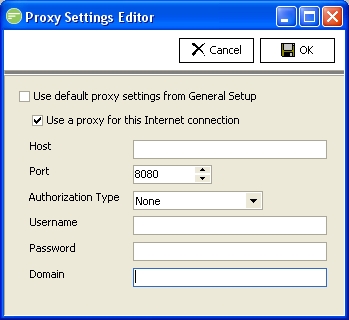
Fields
| Field Name | Description |
|---|---|
| Use default proxy settings from General Setup | Select to use the proxy settings configured within General Setup. Otherwise you can provide custom settings for this connection only |
| Use a proxy for this Internet connection | Select to enable the use of a proxy server for this connection. |
| Host | The computer name or IP address of the proxy server |
| Port | The port that proxy server is listening on. By default most proxy servers listen on port 8080 |
| Authorization Type | The authorization method to use when connecting to the remote HTTP service |
| User Name | A user name to authenticate to the proxy server. Can be left blank. |
| Password | A password for the above user |
| Domain | The domain that the user belongs to. This can be left blank |