
Appearance
LAN (Inbound)
A LAN Transport is used to connect to a shared network folder over the local network. You can receive Files from the shared network folder. You configure the LAN Transport with the appropriate details for connecting to the remote folder and retrieving any files that match your requirements. The Inbound Transport will always activate with a particular File Connection and it is the properties of this File Connection that determine the filter for matching files.
The LAN Transport can only be used with a UNC network path.
WARNING
It is not possible to use mapped network paths if the action is to be executed under FlowService. This is because service applications are not able to access information regarding mapped network drives. You should use the UNC path instead
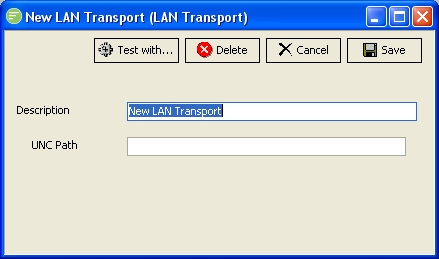
Fields
| Field Name | Description |
|---|---|
| Description | A friendly name for the LAN Transport |
| UNC Path | The UNC path of the shared network folder eg \\computer name\share name\ |
Buttons
| Button Name | Description |
|---|---|
| Save | Click to save any changes you have made. All changes will be lost if you do not click the Save button |
| Cancel | Click to cancel any changes you have made |
| Delete | Click to delete this module. You will be asked to confirm your choice |
| Test With... | Click to test the connection to the remote LAN service. You need to select the File connection that will be used to filter the files and receive any files into. This will cause the transport to run and download any files that exist on the remote LAN service |