
Appearance
SSL Settings
The SSL Settings editor is used for specifying SSL information for Modules that require connection through protocols that support SSL connections. It allows you to enable SSL connection, as well as providing client side certificates for services that support client side certificates.
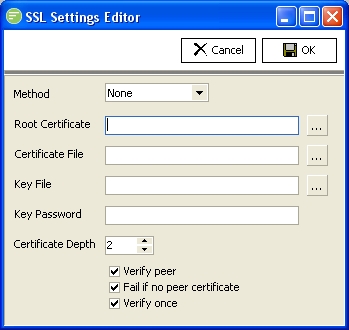
Fields
| Field Name | Description |
|---|---|
| Method | Select the SSL method to use. Select None for no SSL. Select Auto to enable SSL. You should nearly always use Auto rather than specify one of the SSL versions directly. |
| Root Certificate | Specify the root certificate file that your client certificate is based on |
| Certificate File | Select your client certificate file containing your public key |
| Key File | Select your client certificate file containing your private key |
| Key Password | Enter the password used to encrypt your Key File so the software can access the Key file certificate. |
| Certificate Depth | Select the depth of the certificate chain to review when checking server certificate validity |
| Verify peer | Select to enable the verification of the peer (server) certificate. If any details of the certificate are not valid the connection will fail |
| Fail if no peer certificate | Select to fail if the peer (server) does not have a certificate |
| Verify once | Select to verify the certificate once per connection or each time the connection is used. |