
Appearance
User Parameters
User Parameters are configured within a Map at design time. A User Parameter cannot be modified through script within the Map, it can only be referenced.
The purpose of a User Parameter is to store information that doesn't need to change during the execution of a Map, but may need to be changed by a user from time to time. It provides easy access to change parameters without having to hunt through the different Event scripts within the Map. They are useful for settings that need changing when using the Map with different scenarios/clients.
For example, a Map transferring Invoice data to a file may need to include a Tax Number (eg GST, ABN, VAT). This value would need changing if the Map was going to be used for a different client. By storing this value as a User Parameter and then referencing it from within a script it becomes easy to change the value without having to hunt through the different Events of the Map
User Parameters are global to the Map. They can only be set at design time and cannot be modified through script within the Map.
The following screen shot shows the User Parameter list from within the Map Designer.
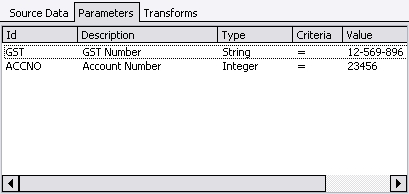
The user can define more parameters by right-clicking the parameter list and selecting New. Be careful when setting the Code of the parameter (the 'ID' column) - it is possible to create a naming conflict if you name it the same as another object in the Map.
For more information regarding the creation of User Parameters refer to the section Maps.
User Parameters are referenced using their ID. Simply drag the parameter onto the script editor, or manually enter it. The value of the parameter can be accessed through the .Value property.
An example of using a User Parameter is
pascal
procedure ScriptEvent (var Value : variant);
begin
Value := GST.Value;
end;
The other properties of a User Parameter are:
- .Code - the parameter's ID (as a String)
- .FriendlyName - the parameter's Description (as a String)
- .ParamType - the parameter's Type (see Field.FieldType.htm).