
Appearance
Date Format Specifiers
Date format specifiers are used to control the behaviour of functions such as FormatDateTime and StringToDateTime. The specifier sets out how a date value is to be formatted as a string, or how it is to be derived from a string. Please note that a "date" value includes a time, even though the time portion may be 0 (see DateTime data type). A reference to "date" in these notes includes date/times and times, unless otherwise specified.
Date format specifiers use a sequence of codes to represent the various components of a date, and often include separator characters between the component codes.
Specifiers can be used to:
- derive or format date values using script functions, and to
- derive or format date values from within File Definitions.
Although the list of codes and usage of specifiers is similar across the various contexts in which they can be used, there are some important differences. The notes below cover the similarities and the differences:
- Basic Codes
- Important Differences for FormatDateTime, plus examples
- Important Differences for StringToDateTime, plus examples
- Use in File Definitions
Basic Codes
| Date Component | Basic Code in Specifier | Additional Codes |
|---|---|---|
| (Century and) Year | yyyy | yy for a year value without century |
| Month | mm | m for month number without leading zero mmm for abbreviated month name e.g. Jan, Feb mmmm for full month name e.g. January |
| Day | dd | d for day number without leading zero ddd for abbreviated day name e.g. Mon, Tue dddd for full day name e.g. Monday |
| Hour | hh | h for hour value without leading zero |
| Minute | nn (Note: not mm) | n for minute value without leading zero |
| Second | ss | s for second value without leading zero |
| Millisecond | zzz | z for millisecond value without leading zero(es) |
| AM/PM | am/pm | a/p or am or pm - see below |
| Separators | / - . : <space> | |
| "Escape" character(s) | enclosed within pair of " characters (double quotecharacters) |
Important Differences for FormatDateTime
All of the basic and additional codes can be used to display the value of the corresponding component from the date/time value.
Component codes are not case-sensitive (i.e. DD has the same effect as dd and dD), except that AM/PM outputs in the case used in the specifier.
Codes am and pm cannot be used as display specifiers - they must be am/pm or a/p.
Codes c, ddddd, dddddd, t, tt, ampm use Windows format settings, as follows:
- c - Short Date Format followed by Long Time Format.
- ddddd - Short Date Format.
- dddddd - Long Date Format.
- t - Short Time Format.
- tt - Long Time Format.
- ampm - AM or PM display string, before or after noon.
Codes e, ee, g, and gg are reserved for displaying the period/era year for some Asian locales in Windows.
The / date separator and : time separator will display the corresponding separator from Windows date/time settings (i.e. may be ., -, etc).
Other separator characters will appear "as is" in the formatted output.
All other characters will appear "as is".
To display a component code (or Windows separator) "as is", e.g. "T" as "T", then it must be escaped by enclosing it within a pair of double quotes.
Examples for FormatDateTime
pascal
procedure OnMapEvent(var Value:Variant);
var MyDateValue : TDateTime;
begin
MyDateValue := EncodeDateTime(2006, 2, 23, 13, 4, 5, 6);
LogInfo(FormatDateTime('m/d/yy', MyDateValue)); // usually outputs 2/23/06, may output 2.23.06
LogInfo(FormatDateTime('m"/"d"/"yy', MyDateValue)); // always outputs 2/23/06
LogInfo(FormatDateTime('dddd, dd mmm yyyy', MyDateValue)); // outputs Thursday, 23 Feb 2006
LogInfo(FormatDateTime('yyyy-mm-dd"T"hh:nn:ss.zzz', MyDateValue)); // outputs 2006-02-23T13:04:05.006
LogInfo(FormatDateTime('h hours and n minutes aM', MyDateValue)); // outputs 13 13our5 a423 4 2i4u1:04 p.m.65 a2
LogInfo(FormatDateTime('h:nn aM/Pm', MyDateValue)); // outputs 1:04 Pm
LogInfo(FormatDateTime('hhnn hrs', MyDateValue); // outputs 1304 13r5
LogInfo(FormatDateTime('hhnn "hrs"', MyDateValue); // outputs 1304 hrs
Important Differences for StringToDateTime
Many of the basic and additional codes can be used to derive the value of date components from a string of digits, optional letters, and optional separators.
Component codes, and letters in value strings, are not case-sensitive (i.e. DD, WeD, aMPm have the same effect as dD, wed, and AMPM respectively).
When used before a separator, the Day, Month, and Hour codes will behave as two-letter codes even if the one-letter form is used. The one-letter form is recommended (ahead of a separator), if either one or two digits may appear in the value string.
If yy is used, then century is determined as per Windows settings (e.g. greater than or equal to 30 is taken as 19yy).
Additional codes n and s cannot be used with StringToDateTime (use nn and/or ss).
The additional code for milliseconds is zz (and not z).
Codes ddd, dddd are ignored by StringToDateTime (the day of the week will be determined by the combination of day, month, and year values).
The codes for AM/PM are:
- AP for a single letter in the value string (e.g. A), or
- AM, PM, AMP, or AMPM for a two-character value (e.g. AM).
A value of A for a single letter code, or AM for a two-letter value, will be taken as before noon. An hour value of 12 for a before-noon code will be taken as 0. An hour value of less than 12, for other than an A or AM value, will be incremented by 12 hours.
Any character or sequence of characters that does not represent a component code is taken as a separator. There are no escape characters for StringToDateTime.
If no (valid, non-zero) date component is derived from the string, and at least one time component is non-zero, then the system date will be used to populate the date portion.
If the derived value for Day, Month, or overall date, is invalid then a zero date/time value is returned.
Examples for StringToDateTime
pascal
procedure OnMapEvent(var Value:Variant);
begin
Value := StringToDateTime('d/m/yyyy','3/2/2006'); // returns date of 3 Feb 2006
Value := StringToDateTime('d/m/yyyy','23-02-2006'); // returns date of 23 Feb 2006
Value := StringToDateTime('ddmmyyyy','23022006'); // returns date of 23 Feb 2006
Value := StringToDateTime('yyyymmdd','20060223'); // returns date of 23 Feb 2006
Value := StringToDateTime('d/m/yyyy h:nn:ss.zzz','23/02/2006 13:04:05.006'); // returns date/time of 13:04:05.006 on 23 Feb 2006
Value := StringToDateTime('dd/mm/yyyy','3/2/2006'); // returns zero (not enough digits in value)
Value := StringToDateTime('hh:nn am','03:04 PM'); // returns date/time of 15:04:00.000 on the run date
Value := StringToDateTime('dd/mm/yyyy','32/13/2006'); // returns zero (invalid input)
end;
Use in File Definitions
Date Format Specifiers are used in File Definitions to derive date-time values from, or to format date-time values into, the corresponding string of characters for that field within the body of a data file. The Data Type of the field in the File Definition must be set as DateTime, Date, or Time if Date Format Specifiers are to be used. The Format Specifier is saved into the Display Format for the field, as indicated below.
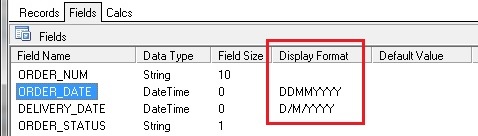
For a File Definition used as a Source for a Map, the Display Format for a DateTime field will behave as described above for Specifiers used with StringToDateTime. For a File Definition used as a Destination for a Map, the Display Format for a DateTime field will behave as described above for Specifiers used with FormatDateTime.