
Appearance
IBM MQ (Inbound)
An IBM MQ Transport is used to connect to a IBM MQ service over the Internet or local network. You can receive Files from the remote IBM MQ service. You configure the IBM MQ Transport with the appropriate details for connecting to the remote service and retrieving any files that match your requirements. The Inbound Transport will always activate with a particular File Connection and it is the properties of this File Connection that determine the filter for matching files.
You will need to install the IBM MQ components on the computer that is running Flow. This provides Flow access to the IBM MQ client library necessary for communication with IBM MQ.
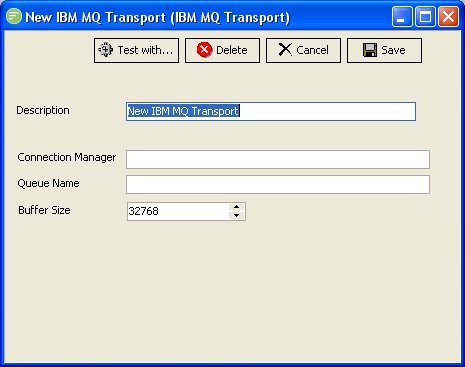
Fields
| Field Name | Description |
|---|---|
| Description | A friendly name for the IBM MQ Transport |
| Connection Manager | The name of the computer running the connection manager |
| Queue Name | The name of the queue configured in the IBM MQ connection manager. |
| Buffer Size | The amount of memory to allocate to the connection. This should be set to a number higher than the size of the files you wish to send to the IBM MQ service. |
Buttons
| Button Name | Description |
|---|---|
| Save | Click to save any changes you have made. All changes will be lost if you do not click the Save button |
| Cancel | Click to cancel any changes you have made |
| Delete | Click to delete this module. You will be asked to confirm your choice |
| Test With... | Click to test the connection to the remote IBM MQ service. You need to select the File connection that will be used to filter the files and receive any files into. This will cause the transport to run and download any files that exist on the remote IBM MQ service |