
Appearance
General Tab (File Connection)
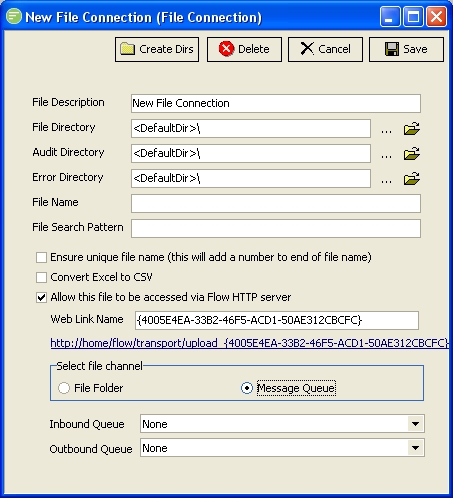
Fields
| Field Name | Description |
|---|---|
| File Directory | The main directory for this File Connection. Click the  button to select a directory. Click the  button to open the specified directory in Windows Explorer |
| Audit Directory | The Audit directory where successful files are stored. Generally a sub directory of the main directory. Click the button to select a directory. Click the button to open the specified directory in Windows Explorer |
| Error Directory | The Error directory where failed files are stored. Generally a sub directory of the main directory. Click the button to select a directory. Click the button to open the specified directory in Windows Explorer |
| File Name | A file name pattern that created files are named as when writing |
| File Search Pattern | A search pattern used to filter files when reading |
| Ensure unique file name | Ensures files with the same name are given unique names |
| Convert Excel to CSV | Converts Excel type files into CSV. Only works with simple Excel formats |
| Allow this file to be accessed via Flow HTTP server | Allows files to be received into this File Connection, or pulled from this File Connection, through the Flow HTTP Server. |
| Web Link Name | The name of the endpoint on the Flow HTTP Server |
| Select File Channel | The method used for receiving files into this File Connection, or for pulling files out of this File Connection, through the Flow HTTP Server |
| Inbound Queue | The inbound message queue used when receiving files into this File Connection through the Flow HTTP Server |
| Outbound Queue | The outbound message queue used when pulling files out of this File Connection through the Flow HTTP Server |