
Appearance
POP (Inbound)
A POP file Transport is used to connect to a POP service provided by an email server. POP can be used over the Internet or on a local network.
A Flow POP Transport works with file attachments to email messages, so that these can be detached and used in file-based processing.
You configure the POP Transport with the appropriate details for connecting to a POP-enabled mailbox on the email server. The Inbound Transport is always used in conjunction with a File Connection, and the properties of the associated File Connection will provide the filter that is used to determine which file attachments are to be retrieved. For example, if the File Connection has a File Search Pattern of ORD*.xml, then an attachment named ORD123.xml would be retrieved but one named INV789.xml would not.
If an email message has multiple attachments that match the associated File Connection's File Search Pattern, then each of those matching attachments will be retrieved (as separate files).
If an email message in the mailbox does not have an attachment, then it will be skipped by the Flow POP Transport and will remain in the mailbox until some other process does something with it. If the Flow POP Transport is able to match a sole attachment, or able to match all of multiple attachments, then the message will be deleted by the Transport after the files have been retrieved. If a message has one or more attachments, but at least of those attachments does not match the File Search Pattern, then the message and all of its attached files will remain the mailbox - unless the "Delete emails even if other attachments exist" option has been selected.
You should note that any email account can potentially receive messages that are not intended as data-file-transfer messages - these might be junk email messages that have not been blocked by anti-spam filters or perhaps corporate communications if the mailbox is included within corporate distribution groups. Also, especially if the data-file-transfer messages are being sent manually and not from a system-generated source, then items such as signature blocks or corporate logos might be transmitted as file attachments and you will have to check that the configuration of the POP Transport - and associated File Connection(s) - will manage the mailbox correctly.
One way of dealing with various combinations of file attachments is to use a File Connection that will accept all file attachments (i.e. a File Search Pattern of *) and which will therefore retrieve all attachments and delete all corresponding messages, and then manage the files by name and/or type after they have been downloaded from the mailbox. A Flow "File Router" Action Step can be used to manage files - see File Router.
The POP Transport can connect to either clear text POP services, or SSL secured POP services.
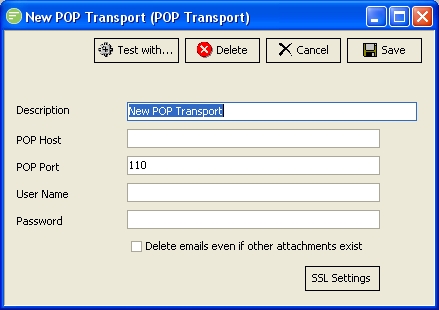
Fields
| Field Name | Description |
|---|---|
| Description | A friendly name for the POP Transport |
| Host | The domain name or IP address of the remote POP service |
| Port | The port the remote POP service is listening on |
| User Name | A user name to connect to the remote POP service |
| Password | A password for the above user |
| Delete emails even if other attachments exist | If selected and an email is received that contains more files than match the filter it will still be deleted. |
Buttons
| Button Name | Description |
|---|---|
| Save | Click to save any changes you have made. All changes will be lost if you do not click the Save button |
| Cancel | Click to cancel any changes you have made |
| Delete | Click to delete this module. You will be asked to confirm your choice |
| Test With... | Click to test the connection to the remote POP service. You need to select the File connection that will be used to filter the files and receive any files into. This will cause the transport to run and download any files that exist on the remote POP service |
| SSL Settings | Click to edit the SSL settings used when making the connection to the POP Transport |