
Appearance
SOAP (Outbound)
DANGER
Deprecated
You should instead use Web Connections and Web Definitions.
A SOAP Transport is used to connect to a SOAP web service over the Internet or local network. You can send Files to the remote SOAP web service. You configure the SOAP Transport with the appropriate details for connecting to the remote service and sending any files.
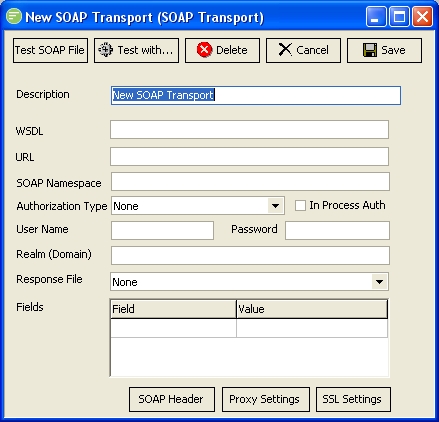
Fields
| Field Name | Description |
|---|---|
| Description | A friendly name for the SOAP Transport |
| WSDL | Enter the path to the WSDL file. This must be a local copy of the WSDL. This is used to extract namespaces for filling in the SOAP request |
| URL | The URL of the remote SOAP service |
| SOAP Namespace | Enter the prefix to use for the SOAP Namespace. By default it will be "SOAP" |
| Authorization Type | The authorization method to use when connecting to the remote SOAP service |
| In Process Auth | Whether authorization occurs in process of communication, or is sent in initial request |
| User Name | A user name to connect to the remote SOAP service |
| Password | A password for the above user |
| Realm (Domain) | The domain that the user belongs to. This can be left blank |
| Response File | Select a File Connection to receive the response. The response will be saved to this File Connection. This allows you to process it with another step in an Action. |
| Fields | A list of fields to include as HTTP Header values. |
Buttons
| Button Name | Description |
|---|---|
| Save | Click to save any changes you have made. All changes will be lost if you do not click the Save button |
| Cancel | Click to cancel any changes you have made |
| Delete | Click to delete this module. You will be asked to confirm your choice |
| Test With... | Click to test the connection to the remote SOAP service. You need to select the File connection that will be used to find a file for sending. This will cause the transport to run and send the first file that exists in the File Connection that match the File Search Pattern. |
| SOAP Header | Click to edit the elements of the SOAP Header |
| Proxy Settings | Click to edit the proxy settings used when making the connection to the SOAP service |
| SSL Settings | Click to edit the SSL settings used when making the connection to the SOAP Transport |